
A healthcare insurance card looks simple at first glance. A logo, a few numbers, maybe a copay amount. But for providers, billers, front desk teams, and revenue cycle staff, that small card controls almost every part of the reimbursement process.
One wrong digit in the member ID can trigger an eligibility failure. A missed payer identifier can send claims to the wrong insurance company. Confusing the group number with the policy number can create billing delays that take weeks to fix.
That is why learning how to read an insurance card correctly matters. It affects eligibility verification, claim submission, prior authorization, coordination of benefits, patient collections, and reimbursement timelines.
Why Insurance Cards Matter in Medical Billing
The insurance card is not just proof of coverage. It acts like an access key to the payer’s system.
Every field on the card connects to a billing function:
- Member ID links the patient to their policy
- Group number identifies the employer or plan sponsor
- Payer contact details route claims correctly
- Copay information helps collect patient responsibility upfront
- BIN, PCN, and Rx numbers support pharmacy billing
- Plan type determines referral and authorization rules
If the data entered from the card is inaccurate, the claim process starts with errors before the patient even sees the provider.
The Main Parts of a Healthcare Insurance Card
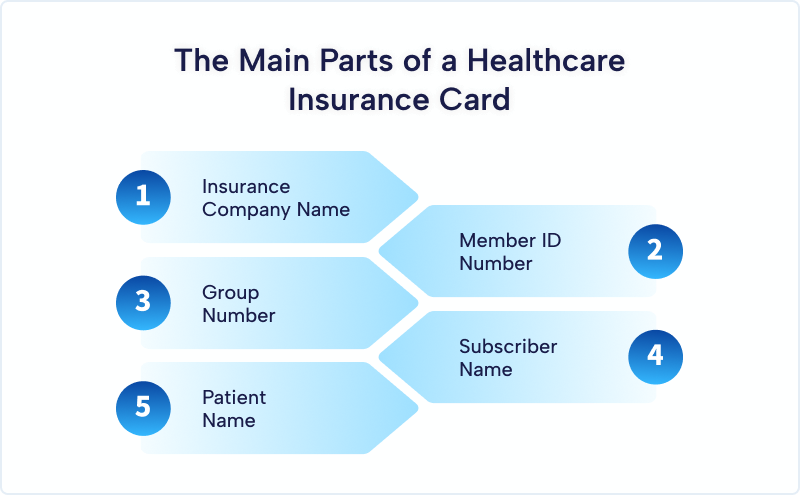
Most commercial, Medicare Advantage, Medicaid managed care, ACA marketplace, and employer sponsored plans use similar card structures. The layout may differ, but the core information stays fairly consistent.
Insurance Company Name
The payer’s name usually appears at the top of the card with the company logo.
Examples include:
- UnitedHealthcare
- Aetna
- Cigna
- Blue Cross Blue Shield
- Humana
This identifies the payer handling claims and benefits administration.
However, providers should never rely only on the logo. Many plans use third party administrators or regional networks. Always verify payer IDs and electronic claim routing instructions separately.
Member ID Number
The member ID is the most important identifier on the card.
It connects the patient to their insurance policy inside the payer’s database. Eligibility checks, claim processing, prior authorizations, and portal access all depend on this number.
Member IDs may include:
- Numbers only
- Letters and numbers
- Prefixes or suffixes
- Hyphens or special formatting
Examples:
- ABC123456789
- XDJ45872101
- 000458772A
Always enter the member ID exactly as printed.
Common mistakes include:
- Confusing letter O with zero
- Dropping prefix letters
- Adding spaces incorrectly
- Missing suffix characters
A single typo can cause immediate eligibility rejection.
Group Number
The group number identifies the employer, organization, or benefit group connected to the policy.
Providers use this number for:
- Claims processing
- Eligibility verification
- Employer sponsored plan identification
- Coordination of benefits review
Individual marketplace plans may not always include a group number. Employer plans almost always do.
Think of it this way:
- Member ID identifies the patient
- Group number identifies the insurance plan group
Subscriber Name
The subscriber is the person who owns the insurance policy.
That may be:
- The patient
- A parent
- A spouse
- A guardian
In pediatric billing especially, the subscriber and patient are often different people.
Claims fail frequently when staff accidentally enter the patient as the subscriber instead of the actual policy holder.
Patient Name
Some cards show both the subscriber and dependent names. Others only display the subscriber.
Always verify:
- Exact spelling
- Middle initials
- Date of birth
- Relationship to subscriber
These details matter during eligibility checks and coordination of benefits.
Understanding Plan Types on Insurance Cards
The insurance card often includes abbreviations that define network and referral rules.
HMO Plans
Health Maintenance Organization plans usually require:
- Primary care physician selection
- Referrals for specialists
- Strict in network usage
Failure to obtain referrals may result in claim denials.
PPO Plans
Preferred Provider Organization plans offer broader network flexibility.
Patients can usually:
- Self-refer to specialists
- Access out of network care
- Avoid referral requirements
However, out of network reimbursement may be lower.
EPO Plans
Exclusive Provider Organization plans combine features of HMOs and PPOs.
Patients generally do not need referrals but must stay in network for coverage.
POS Plans
Point of Service plans require PCP coordination while still allowing some out of network access.
Copay, Coinsurance, and Deductible Information
Many cards display patient cost sharing information directly on the front.
Examples include:
- PCP: $25
- Specialist: $50
- ER: $250
- Rx Generic: $10
This helps front desk teams collect patient responsibility at check in.
But do not rely only on printed copays. Benefits change frequently. Always verify active coverage electronically before the visit.
Rx Information on Insurance Cards
Many cards contain pharmacy billing information.
Common fields include:
BIN Number
The Bank Identification Number routes pharmacy claims to the correct processor.
PCN Number
The Processor Control Number identifies the pharmacy claims processing route.
Rx Group
This identifies the pharmacy benefit group.
Pharmacy Help Desk Number
Pharmacies and providers use this for medication coverage questions.
These fields matter heavily during:
- Prior authorization requests
- Specialty medication billing
- Pharmacy claim troubleshooting
Payer Contact Information
Insurance cards usually include phone numbers for:
- Provider services
- Member services
- Prior authorization
- Behavioral health
- Pharmacy support
Provider service lines help billing teams verify:
- Eligibility
- Claims status
- Authorization requirements
- Fee schedules
- Coordination of benefits
Many cards also include mailing addresses for paper claims.
Payer ID and Electronic Claims Submission
Some cards display a payer ID used for electronic claims.
This number tells clearinghouses where to route claims electronically.
Examples:
- 87726
- 60054
- 62308
Entering the wrong payer ID can redirect claims incorrectly and delay payment.
Always confirm payer IDs through your clearinghouse because some insurance companies use different IDs for different products.
How Providers Use Insurance Card Data
Eligibility Verification
Front desk teams use the member ID, group number, and subscriber details to verify:
- Active coverage
- Copays
- Deductibles
- Authorization requirements
- Coverage limitations
Most systems return responses within seconds if the data matches exactly.
Prior Authorization
Authorization teams use policy information to determine:
- Whether authorization is required
- Which services need approval
- Which provider is considered in network
- Which clinical guidelines apply
Claims Submission
Billers use insurance card details to:
- Assign correct payer sequence
- Submit claims electronically
- Prevent demographic mismatches
- Avoid clearinghouse rejections
Coordination of Benefits
Patients with multiple policies require accurate primary and secondary payer setup.
Incorrect sequencing causes:
- Claim denials
- Payment delays
- Duplicate billing issues
- Incorrect EOB generation
Common Insurance Card Errors That Cause Denials
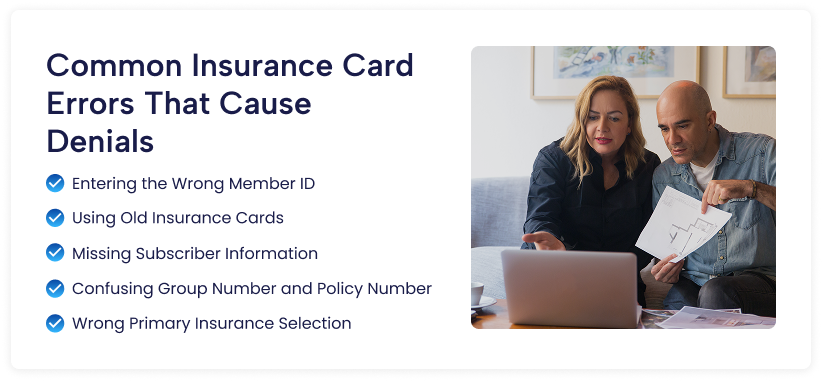
Entering the Wrong Member ID
The most common mistake in eligibility and claims processing.
Even one incorrect character can trigger rejection.
Using Old Insurance Cards
Patients often present outdated cards after employer changes or annual renewals.
Always request updated cards at every visit.
Missing Subscriber Information
Dependent policies frequently fail when the subscriber’s DOB or name is missing.
Confusing Group Number and Policy Number
Staff sometimes enter the group number into the member ID field.
That mistake immediately breaks eligibility verification.
Wrong Primary Insurance Selection
Incorrect coordination of benefits setup sends claims to the wrong payer first.
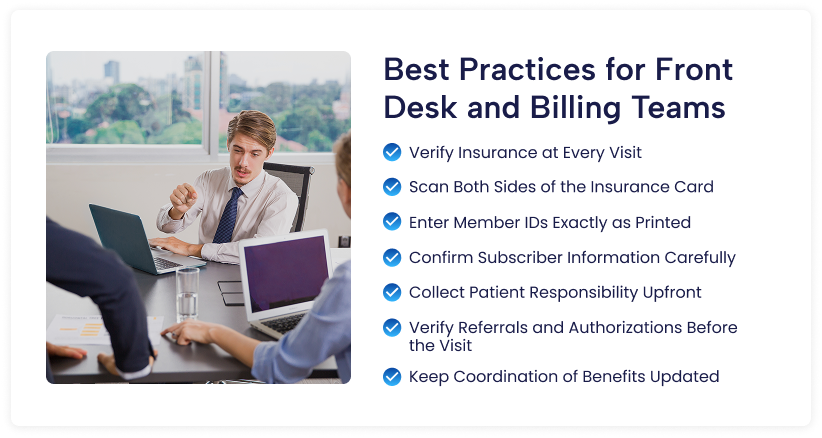
Best Practices for Front Desk and Billing Teams
Front desk mistakes do not stay at the front desk. A small registration error can travel through the entire revenue cycle and eventually turn into denied claims, delayed payments, patient complaints, and rework for billing staff.
Strong intake workflows help practices reduce denials before the claim is even created. When front desk and billing teams work together, reimbursement becomes faster and cleaner.
Verify Insurance at Every Visit
Do not assume the insurance on file is still active because the patient visited last month. Employers change plans, Medicaid eligibility changes, and commercial policies terminate regularly.
Verify:
- Active coverage status
- Effective dates
- Copay amounts
- Deductible status
- Referral or authorization requirements
Even established patients should complete insurance verification before every appointment.
Scan Both Sides of the Insurance Card
Many offices only scan the front of the card. That creates avoidable problems later.
The back of the card often contains:
- Claims mailing addresses
- Prior authorization instructions
- Provider service phone numbers
- Pharmacy benefit details
- Behavioral health contact information
Missing this information slows down billing and authorization workflows.
Enter Member IDs Exactly as Printed
Insurance systems are extremely sensitive to formatting errors.
A single typo can trigger:
- Eligibility rejection
- Claim denial
- Invalid member responses
- Clearinghouse edits
Always compare the entered ID against the card character by character. Pay close attention to:
- Prefix letters
- Hyphens
- Suffixes
- Zeros versus the letter O
Accuracy matters more than speed here.
Confirm Subscriber Information Carefully
The patient is not always the policy holder.
This matters especially for:
- Pediatric claims
- Spouse dependent coverage
- College student plans
Always verify:
- Subscriber name
- Date of birth
- Relationship to patient
- Subscriber address if required by payer
Incorrect subscriber data causes frequent demographic denials.
Collect Patient Responsibility Upfront
Practices that collect at check in usually collect more overall.
Once the patient leaves, collection rates drop sharply. Front desk staff should review eligibility results before the visit and clearly explain:
- Copays
- Deductibles
- Coinsurance estimates
- Outstanding balances
Patients respond better when costs are explained early instead of appearing later in a statement.
Verify Referrals and Authorizations Before the Visit
Many HMO and managed care plans require:
- PCP referrals
- Prior authorization
- Pre certification
- Network approval
If authorization is missing, the practice risks nonpayment even when the service was medically necessary.
Create workflows that flag authorization requirements before the appointment date.
Keep Coordination of Benefits Updated
Patients with multiple insurance plans create billing complications when primary and secondary payers are entered incorrectly.
Review coordination of benefits regularly, especially when:
- A patient changes job
- A child has coverage through both parents
- Medicare eligibility begins
- Medicaid becomes secondary
Wrong payer sequencing leads to denials and rebilling delays.
How Digital Insurance Cards Are Changing Verification
Many patients now use mobile insurance cards through payer apps.
Examples include apps from:
- myCigna
- UnitedHealthcare
- Aetna Health
Digital cards work similarly to physical cards, but staff should still verify:
- Effective dates
- Updated plan IDs
- Current network participation
Screenshots from old plans often remain saved on patient phones long after coverage ends.
Final Thoughts
Reading a healthcare insurance card correctly sounds basic, but it directly impacts revenue cycle performance. Most eligibility failures, front end denials, and demographic claim rejections begin with incorrect insurance data capture.
A trained front desk team can prevent many downstream billing problems before the claim even enters the system.
When providers treat insurance intake as a clinical level workflow instead of a simple registration task, reimbursement becomes faster, cleaner, and far less expensive to manage.
Frequently Asked Questions
What does a front desk person do when the patient’s name on the insurance card does not match their driver’s license?
Ask the patient about the discrepancy. A common situation involves a married patient who uses a married name on the license but a maiden name on the insurance card because the employer never updated the records. The claim must use the name on the insurance card. The practice also needs to verify the patient’s identity through another method, like date of birth and address.
Can a practice refuse service if the patient cannot produce an insurance card?
Yes, for non-emergency services. A practice has no obligation to treat a patient without verified coverage for a routine appointment. The practice can reschedule the appointment until the patient provides proof of insurance. Emergency services are different. Emergency rooms cannot refuse treatment based on insurance status.
What happens when a patient shows a card but the eligibility check shows no active coverage?
The coverage is not active. The patient may have a terminated plan, a lapsed payment, or an incorrect card. Do not proceed with the appointment without resolving this. The patient can pay cash for the visit or reschedule after contacting their insurance company.
How often should a practice verify insurance eligibility for established patients?
Every single visit. Insurance plans change all the time. An employer can switch carriers at any time. A patient can lose coverage due to job loss or missed premium payments. A thirty second real time eligibility check at every visit prevents nasty surprises.
What is the difference between the member ID and the group number?
The member ID identifies the specific patient. It is unique to that person. The group number identifies the employer or organization that sponsors the plan. Everyone at the same employer has the same group number but different member IDs. Commercial plans need both numbers for accurate claim processing.