
Submitting an accurate insurance claim is one of the most important steps in the healthcare revenue cycle. Even when providers deliver excellent patient care, errors on a claim form can delay reimbursement, trigger denials, or require costly rework.
For hospitals and other institutional healthcare facilities, the UB-04 (CMS-1450) is the standard claim form used to bill Medicare, Medicaid, and most commercial insurance companies.
Unlike the CMS-1500 claim form, which physicians and other individual healthcare professionals use for professional services, the UB-04 reports institutional services such as inpatient care, outpatient hospital services, skilled nursing care, rehabilitation, hospice, and home health services.
Understanding how the UB-04 works helps healthcare organizations improve claim accuracy, reduce insurance claim denials, and receive reimbursement more efficiently.
This guide explains everything you need to know about the UB-04 claim form, including who uses it, when it should be used, how to complete it correctly, and how to submit institutional claims successfully.
What Is the UB-04 (CMS-1450) Claim Form?
The UB-04, officially known as the CMS-1450, is the standard institutional claim form developed by the National Uniform Billing Committee (NUBC) for billing facility-based healthcare services.
Healthcare facilities use this form to report services provided to patients and request reimbursement from Medicare, Medicaid, commercial insurance companies, and other third-party payers.
Although providers may occasionally submit a paper UB-04, most institutional claims are transmitted electronically using the HIPAA 837 Institutional (837I) transaction.
The paper UB-04 remains the official reference for understanding the data elements required on institutional claims.
The UB-04 does much more than request payment.
It provides insurance companies with standardized information needed to determine:
- Patient eligibility
- Covered services
- Medical necessity
- Diagnosis information
- Procedures performed
- Revenue codes
- Charges
- Provider information
- Payment responsibility
Accurate claim completion helps healthcare facilities:
- Reduce claim denials
- Improve first-pass claim acceptance
- Accelerate reimbursement
- Support regulatory compliance
- Maintain accurate medical billing records
Because institutional claims often involve high-dollar services, even minor billing errors can have a significant financial impact.
Who Uses the UB-04 Claim Form?
The UB-04 is designed for institutional providers, not individual physicians billing professional services.
Healthcare organizations that commonly use the UB-04 include:
- Acute care hospitals
- Critical access hospitals
- Skilled nursing facilities (SNFs)
- Inpatient rehabilitation facilities
- Long-term care hospitals
- Psychiatric hospitals
- Home health agencies
- Hospice providers
- Community Mental Health Centers (CMHCs)
- Rural Health Clinics (RHCs)
- Federally Qualified Health Centers (FQHCs)
- Hospital outpatient departments
- Comprehensive outpatient rehabilitation facilities
- End-stage renal disease (ESRD) facilities
- Certain ambulatory surgery and specialty facilities, depending on payer requirements
Individual physicians who bill professional services generally use the CMS-1500 instead of the UB-04.
UB-04 vs. CMS-1500: What’s the Difference?
Although both forms request insurance reimbursement, they serve different purposes.
| Feature | UB-04 (CMS-1450) | CMS-1500 |
| Used By | Institutional providers | Individual healthcare professionals |
| Claim Type | Facility services | Professional services |
| Electronic Version | 837 Institutional (837I) | 837 Professional (837P) |
| Governing Organization | National Uniform Billing Committee (NUBC) | Centers for Medicare & Medicaid Services (CMS) |
| Common Users | Hospitals, SNFs, Hospices, Home Health Agencies | Physicians, Therapists, Nurse Practitioners, Physician Assistants |
Choosing the correct claim form is essential because insurers reject claims submitted on the wrong form.
When Should You Use the UB-04 Claim Form?
Facilities generally use the UB-04 whenever they bill institutional healthcare services.
Examples include:
- Hospital admissions
- Emergency department visits
- Outpatient surgery
- Observation services
- Skilled nursing care
- Hospice services
- Home health visits
- Rehabilitation services
- Dialysis services
- Behavioral health facility services
Professional services performed by physicians during these encounters are usually billed separately on the CMS-1500 claim form unless payer rules specify otherwise.
Information You Need Before Completing the UB-04
Preparing a clean claim starts long before entering information on the form.
Before completing the UB-04, gather:
- Patient demographic information
- Insurance identification
- Admission and discharge dates
- Medical record documentation
- Diagnosis codes (ICD-10-CM)
- Procedure codes (ICD-10-PCS for inpatient hospital claims or applicable outpatient coding requirements)
- Revenue codes
- Condition codes
- Occurrence codes
- Value codes
- National Provider Identifier (NPI)
- Tax Identification Number (TIN)
- Total charges
- Attending provider information
Accurate source documentation reduces billing errors later in the revenue cycle.
How to Prepare a UB-04 (CMS-1450) Claim Form
Preparing a UB-04 claim requires more than simply entering patient information. Every field on the form communicates important details about the services your facility provided. Missing or inaccurate information can result in claim rejections, payment delays, or reimbursement reductions.
The following step-by-step process reflects how institutional billers typically prepare a UB-04 claim before submission.
Step 1: Enter Facility Information
The first section identifies the healthcare facility submitting the claim.
Form Locator (FL) 1: Provider Name, Address, and Telephone Number
Enter your facility’s:
- Legal business name
- Street address
- City, state, and ZIP code
- Telephone number
The information should exactly match the records maintained by the payer.
FL 2: Pay-to Name and Address (If Different)
Complete this field only when payments should be mailed to a different address than the provider’s primary business location.
Many facilities leave this field blank because the payment address matches the billing address.
FL 3a: Patient Control Number
Enter the facility’s internal account number used to identify the patient’s account.
This number helps providers track claims after submission.
FL 3b: Medical Record Number
Enter the patient’s medical record number assigned by the facility.
This identifier helps connect the insurance claim with the patient’s clinical documentation.
Step 2: Record Patient and Visit Information
This section identifies the patient and summarizes the episode of care.
FL 4: Type of Bill (TOB)
The Type of Bill is one of the most important fields on the UB-04.
It identifies:
- Facility type
- Classification of care
- Frequency of the claim
For example, different Type of Bill codes distinguish inpatient hospitals, outpatient hospitals, skilled nursing facilities, home health agencies, and replacement or corrected claims.
Always report the appropriate Type of Bill according to National Uniform Billing Committee (NUBC) guidelines and payer requirements.
FL 6: Statement Covers Period
Enter the beginning and ending dates for the services included on the claim.
For inpatient claims, this usually reflects the admission and discharge dates.
For outpatient services, it generally reflects the date or range of service.
FL 8: Patient Name
Enter the patient’s full legal name exactly as it appears on the insurance card.
FL 9: Patient Address
Include the patient’s complete mailing address.
FL 10: Patient Date of Birth
Report the patient’s date of birth using the required date format.
FL 11: Patient Sex
Identify the patient’s reported sex according to payer requirements.
FL 12: Admission Date
Report the patient’s admission date for inpatient services.
For outpatient services, follow payer-specific reporting requirements.
FL 13: Admission Hour
Record the hour the patient was admitted using the required format.
FL 14: Admission Type
Identify the type of admission, such as:
- Emergency
- Urgent
- Elective
- Newborn
- Trauma
Selecting the correct admission type supports accurate claim processing.
Step 3: Enter Insurance Information
Accurate insurance information helps ensure the claim reaches the correct payer.
FL 50: Payer Name
List each payer responsible for payment.
If multiple insurance plans exist, report them in the proper coordination of benefits order.
FL 51: Health Plan Identification Number
Enter the payer identification number when required.
FL 53: Assignment of Benefits
Indicate whether the provider has authorization to receive payment directly from the insurance company.
FL 54: Prior Payments
Report any payments received before claim submission, when applicable.
FL 58: Insured’s Name
Enter the name of the insured individual if different from the patient.
FL 60: Insured’s Unique Identifier
Report the patient’s insurance member identification number exactly as shown on the insurance card.
Even one incorrect digit can result in claim rejection.
FL 62: Insurance Group Number
Include the group number when required by the payer.
Step 4: Report Revenue Codes and Charges
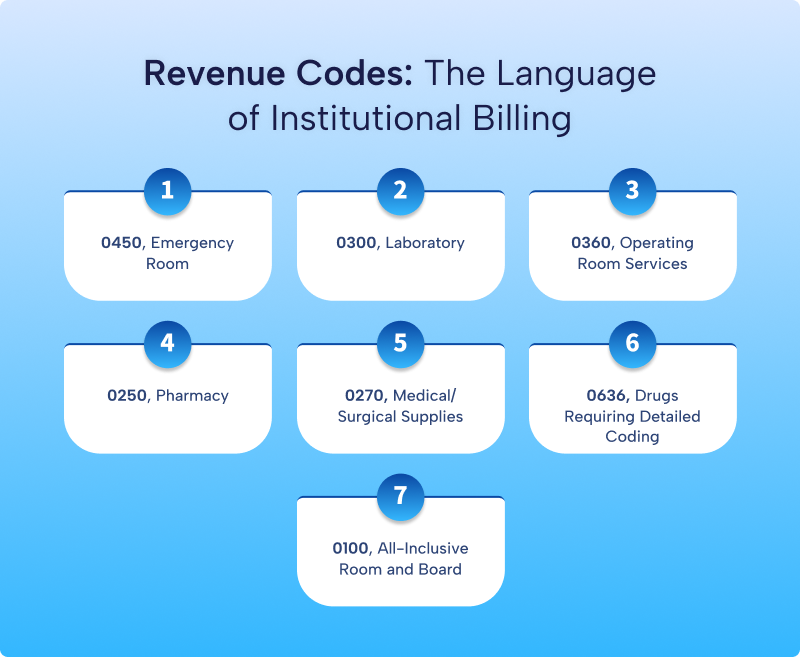
Revenue codes identify the department or category of services provided.
This section directly affects reimbursement because insurers use revenue codes together with diagnosis and procedure codes to evaluate the claim.
FL 42: Revenue Code
Report the appropriate four-digit revenue code for each service.
Common examples include:
| Revenue Code | Description |
| 0250 | Pharmacy |
| 0300 | Laboratory |
| 0360 | Operating Room |
| 0420 | Physical Therapy |
| 0450 | Emergency Room |
| 0510 | Clinic |
| 0761 | Treatment Room |
Always verify the correct revenue code based on the service provided and payer requirements.
FL 43: Revenue Description
Provide a brief description of the service associated with the revenue code.
FL 44: HCPCS/CPT Code
Report the applicable HCPCS Level II or CPT code when required for outpatient services.
Certain inpatient claims may not require CPT reporting because they rely on ICD-10-PCS procedure coding instead.
FL 45: Service Date
Enter the date each service was performed.
FL 46: Service Units
Report the number of units provided.
Examples include:
- Number of therapy visits
- Number of medications
- Number of treatment sessions
FL 47: Total Charges
Enter the total charge for each revenue code line.
Charges should match the facility’s chargemaster and billing records.
FL 48 and FL 49
Complete these fields only when required by payer-specific instructions.
Step 5: Report Diagnosis Information
Diagnosis codes explain why the patient received treatment.
FL 66: Principal Diagnosis
Report the principal ICD-10-CM diagnosis responsible for the admission or encounter.
The principal diagnosis should accurately reflect the provider’s documentation.
FL 67-72: Other Diagnoses
Report additional diagnoses that affected patient care during the encounter.
Include only diagnoses supported by the medical record.
Present on Admission (POA) Indicators
For applicable inpatient Medicare claims, report Present on Admission indicators according to CMS requirements.
Accurate diagnosis reporting supports medical necessity and appropriate reimbursement.
Step 6: Report Procedures
Some institutional claims require reporting procedures performed during the encounter.
FL 74: Principal Procedure
For inpatient hospital claims, report the principal ICD-10-PCS procedure code along with the procedure date when applicable.
For outpatient claims, report the appropriate CPT or HCPCS codes according to payer requirements.
Always ensure the reported procedures match the clinical documentation.
Step 7: Complete Provider Information
The final section identifies the healthcare professionals responsible for the patient’s care.
FL 76: Attending Provider
Report:
- Provider’s full name
- National Provider Identifier (NPI)
The attending provider directs the patient’s care during the encounter.
FL 77: Operating Provider
Complete this field when an operating physician performed a surgical procedure.
FL 78-79: Other Providers
Report additional providers involved in the patient’s care when required by the payer.
FL 81: Code-Code Field
Some payers require additional provider identifiers or other qualifying information in this field.
Review payer-specific billing instructions before completing FL 81.
Review the Claim Before Submission
Before submitting the UB-04, perform a final quality review to verify:
- Patient demographics are accurate.
- Insurance information matches the patient’s records.
- Diagnosis and procedure codes support medical necessity.
- Revenue codes correspond to the reported services.
- Dates of service are correct.
- Charges match the facility’s billing records.
- NPIs and provider information are complete.
- Required condition, occurrence, and value codes have been reported when applicable.
A thorough review helps improve first-pass claim acceptance and reduces the need for costly corrections after submission.
The next section will cover how to submit a UB-04 claim, common billing mistakes, best practices to improve claim acceptance, followed by the conclusion and FAQs.
How to Submit a UB-04 (CMS-1450) Claim
Completing the UB-04 accurately is only part of the billing process. The next step is submitting the claim to the correct payer using the appropriate electronic or paper submission method.
Today, nearly all institutional claims are submitted electronically because electronic claims process faster, reduce errors, and allow providers to monitor claim status more efficiently.
Here’s the typical institutional claim submission workflow.
Step 1: Verify the Claim One Final Time
Before transmitting the claim, perform one final review.
Confirm that:
- Patient demographics match the insurance records.
- Insurance eligibility was verified.
- Revenue codes match the services provided.
- Diagnosis and procedure codes support medical necessity.
- Required modifiers have been applied.
- Provider NPIs are correct.
- Total charges are accurate.
- The Type of Bill (TOB) is appropriate.
- Required signatures and documentation are complete.
Many claim denials occur because of simple data entry mistakes that quality checks can prevent.
Step 2: Submit the Claim Electronically
Most healthcare facilities submit UB-04 claims electronically using the HIPAA 837 Institutional (837I) transaction.
Electronic submission offers several advantages:
- Faster claim processing
- Fewer data entry errors
- Immediate acknowledgment reports
- Easier claim tracking
- Faster reimbursement
Facilities typically transmit claims through:
- Clearinghouses
- Medicare Administrative Contractors (MACs)
- State Medicaid portals
- Commercial payer electronic claim portals
Paper UB-04 forms remain available but are generally limited to specific situations when electronic submission is not required or accepted.
Step 3: Monitor Claim Acceptance
Submitting the claim does not guarantee payment.
After transmission, review the acknowledgment reports.
The claim may receive one of several statuses:
- Accepted
- Rejected
- Pending
- Suspended for review
Rejected claims never enter the payer’s adjudication system. Correct the errors and resubmit them promptly.
Accepted claims move forward for payment processing.
Step 4: Respond to Additional Information Requests
Some payers request additional documentation before completing claim adjudication.
Examples include:
- Medical records
- Operative reports
- Therapy documentation
- Physician orders
- Prior authorization records
- Discharge summaries
Respond quickly to avoid unnecessary payment delays.
Step 5: Receive the Remittance Advice
After processing the claim, the payer issues a payment decision through an Electronic Remittance Advice (ERA) or a paper Explanation of Benefits (EOB).
The remittance explains:
- Approved charges
- Allowed amount
- Payment issued
- Patient responsibility
- Contractual adjustments
- Claim denials
- Reason codes
- Remark codes
Review every remittance carefully before posting payments.
Step 6: Post Payments and Follow Up
Once payment arrives:
- Post payments accurately.
- Apply contractual adjustments.
- Bill the patient for any remaining balance when appropriate.
- Follow up on partially paid or unpaid claims.
- Appeal incorrect denials within the payer’s filing deadline.
Consistent follow-up helps reduce accounts receivable and improves cash flow.
Common UB-04 Billing Mistakes
Institutional claims often involve numerous data elements. Even a small mistake can delay reimbursement.
Common billing errors include:
Incorrect Type of Bill (TOB)
Selecting the wrong Type of Bill may result in immediate claim rejection.
Invalid Revenue Codes
Revenue codes should accurately describe the department or service provided.
Incorrect revenue codes may cause payment delays or underpayments.
Diagnosis Coding Errors
Common diagnosis issues include:
- Unsupported diagnoses
- Incorrect code sequencing
- Missing diagnosis codes
- Outdated ICD-10-CM codes
Always code from the provider’s documentation.
Missing Procedure Codes
Certain outpatient services require CPT or HCPCS codes in addition to revenue codes.
Missing procedure codes frequently trigger claim edits.
Incorrect Patient Information
Simple mistakes such as misspelled names, incorrect birth dates, or invalid member identification numbers commonly result in claim rejection.
Billing Without Verifying Insurance
Coverage may change between visits.
Verifying eligibility before providing services reduces preventable denials.
Missing Prior Authorization
Some inpatient admissions, surgeries, behavioral health services, rehabilitation services, and high-cost procedures require prior authorization.
Failure to obtain authorization may result in nonpayment.
Late Claim Submission
Every payer establishes timely filing deadlines.
Missing those deadlines can lead to permanent loss of payment.
Develop internal workflows to ensure claims are submitted promptly after services are provided.
Best Practices to Improve First-Pass Claim Acceptance
Successful revenue cycle management begins long before claim submission.
Healthcare organizations can improve clean claim rates by following these best practices.
Verify Insurance Before the Visit
Confirm:
- Active coverage
- Patient eligibility
- Benefits
- Prior authorization requirements
- Coordination of benefits
Maintain Accurate Clinical Documentation
Documentation should clearly support:
- Medical necessity
- Diagnoses
- Procedures performed
- Provider orders
- Dates of service
Complete documentation strengthens reimbursement and supports audit readiness.
Keep Coding Current
Coding rules change every year.
Regularly update:
- ICD-10-CM codes
- ICD-10-PCS codes
- HCPCS Level II codes
- Revenue codes
- National Uniform Billing Committee (NUBC) reporting requirements
Continuing education helps billing teams remain compliant.
Perform Internal Claim Audits
Routine audits help identify:
- Coding errors
- Documentation deficiencies
- Missing information
- Billing trends
- Denial patterns
Correcting recurring problems improves overall billing performance.
Track Key Revenue Cycle Metrics
Monitoring performance helps organizations identify improvement opportunities.
Important metrics include:
- Clean claim rate
- First-pass acceptance rate
- Days in Accounts Receivable (A/R)
- Denial rate
- Net collection rate
- Average reimbursement time
- Claim rejection rate
These indicators provide valuable insight into the financial health of your organization.
Paper UB-04 vs. Electronic Claims
Although the UB-04 originated as a paper claim form, electronic billing has become the industry standard.
| Feature | Paper UB-04 | Electronic 837I |
| Processing Speed | Slower | Faster |
| Manual Data Entry | Required | Minimal |
| Claim Tracking | Limited | Real-time status available |
| Error Detection | Manual | Automated claim edits |
| Payment Time | Longer | Typically faster |
| Administrative Cost | Higher | Lower |
Most Medicare, Medicaid, and commercial insurers strongly encourage or require electronic claim submission because it improves efficiency and reduces administrative costs.
Conclusion
The UB-04 (CMS-1450) claim form serves as the foundation of institutional medical billing in the United States. Hospitals, skilled nursing facilities, rehabilitation centers, home health agencies, hospices, and many other healthcare organizations rely on this standardized claim form to report services accurately and receive reimbursement from Medicare, Medicaid, and commercial insurance companies.
Preparing a clean UB-04 claim requires careful attention to every section of the form. From selecting the correct Type of Bill and reporting accurate revenue codes to assigning diagnosis and procedure codes that support medical necessity, each detail contributes to successful claim processing.
Frequently Asked Questions
What is the UB-04 claim form?
The UB-04, also known as the CMS-1450, is the standard institutional claim form used by hospitals and other healthcare facilities to bill Medicare, Medicaid, commercial insurance companies, and other third-party payers for facility-based healthcare services.
Who uses the UB-04 claim form?
The UB-04 is commonly used by:
- Hospitals
- Skilled nursing facilities
- Home health agencies
- Hospice providers
- Inpatient rehabilitation facilities
- Community Mental Health Centers
- Rural Health Clinics
- Federally Qualified Health Centers
- Long-term care hospitals
- Other institutional healthcare providers
Individual physicians typically use the CMS-1500 claim form instead.
What is the difference between the UB-04 and the CMS-1500?
The UB-04 reports institutional or facility services, while the CMS-1500 reports professional services provided by physicians and other qualified healthcare professionals.
Is the UB-04 still used if claims are submitted electronically?
Yes. Although most institutional claims are submitted electronically using the HIPAA 837 Institutional (837I) transaction, the UB-04 remains the standard paper claim form and serves as the basis for the electronic data elements.
What information is required to complete a UB-04 claim?
A typical UB-04 claim includes:
- Facility information
- Patient demographics
- Insurance information
- Type of Bill
- Revenue codes
- Diagnosis codes
- Procedure codes
- Charges
- Provider NPIs
- Dates of service
- Attending provider information
Additional fields may be required depending on the payer and the type of service provided.
What are revenue codes on the UB-04?
Revenue codes are four-digit numeric codes that identify the department or category of service provided by the healthcare facility, such as emergency room services, laboratory testing, pharmacy, physical therapy, or operating room services.
Why are UB-04 claims denied?
Common reasons include:
- Incorrect Type of Bill
- Invalid revenue codes
- Diagnosis or procedure coding errors
- Missing prior authorization
- Incorrect patient information
- Incomplete documentation
- Eligibility issues
- Duplicate claims
- Timely filing violations
Many of these issues can be prevented through strong quality control processes.
What is the electronic version of the UB-04 claim form?
The electronic equivalent of the UB-04 is the HIPAA 837 Institutional (837I) transaction, which healthcare facilities use to submit institutional claims electronically to Medicare, Medicaid, commercial insurers, and clearinghouses.
How long does it take for a UB-04 claim to process?
Processing times vary by payer. Electronic claims are generally processed more quickly than paper claims, provided they are complete, accurate, and do not require additional documentation or manual review.
How can healthcare facilities improve UB-04 claim acceptance?
Facilities can improve first-pass claim acceptance by verifying patient eligibility before services are provided, maintaining complete clinical documentation, using accurate diagnosis and procedure codes, reviewing claims before submission, keeping coding resources up to date, and monitoring denial trends to identify recurring issues.